TM SIM Registration Online
Register TM SIM card is mandatory in the Philippines. Whether you purchased a new prepaid SIM or already have an existing one, you need to complete the registration process to keep your mobile number active and continue enjoying calls, texts, and mobile data.
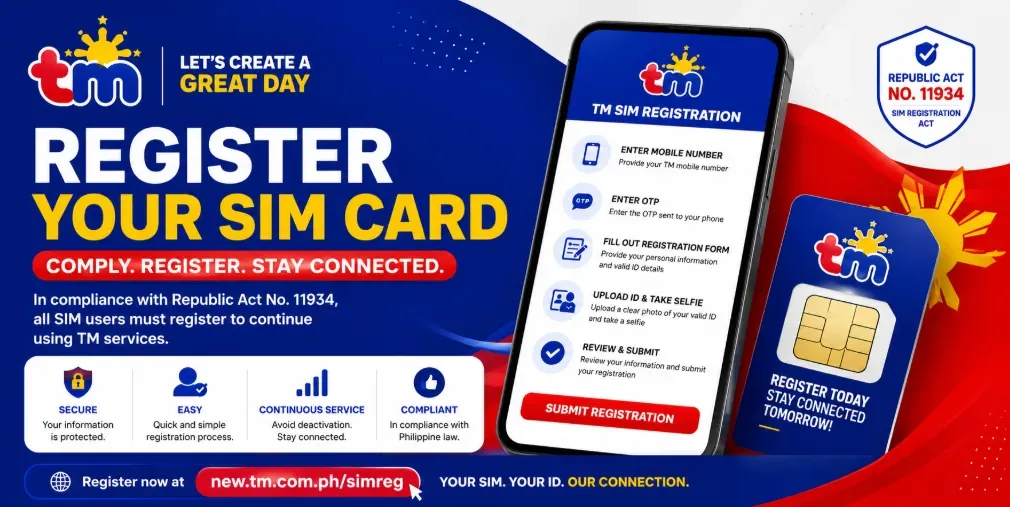
This guide explains how to register your TM SIM card online, the requirements, common issues, and frequently asked questions.
What Is TM SIM Registration?
TM SIM registration is the process of linking your TM mobile number to your personal identity by submitting your information and a valid government-issued ID. The registration helps improve mobile security, reduce scams, and comply with Philippine law.
All TM subscribers, including prepaid and postpaid users, are required to register their SIM cards.
Requirements for TM SIM Registration
Before starting the registration process, prepare the following:
- Active TM SIM card
- Mobile phone with internet access
- One-Time Password (OTP) sent to your TM number
- Valid government-issued ID
- Clear selfie for identity verification
- Personal information including:
- Full name
- Date of birth
- Gender
- Nationality
- Address
Accepted Valid IDs
You can use one of the following valid IDs during registration:
- Philippine Passport
- Driver’s License
- National ID (PhilSys)
- UMID Card
- PRC ID
- SSS ID
- GSIS ID
- Postal ID
- Voter’s ID (if accepted)
- Senior Citizen ID
- OWWA ID
- NBI Clearance
- Police Clearance
- PWD ID
- IBP ID
- School ID (for eligible students)
How to Register TM SIM Card Online
Follow these simple steps:
Step 1: Visit the TM SIM Registration Portal
Open the official TM SIM registration website using your browser.
Step 2: Enter Your TM Mobile Number
Type your 11-digit TM mobile number and click Register.
Step 3: Verify the OTP
A One-Time Password (OTP) will be sent via SMS.
Enter the OTP before it expires.
Step 4: Fill Out the Registration Form
Provide your:
- Full name
- Date of birth
- Address
- Nationality
- Gender
Double-check all information before proceeding.
Step 5: Upload Your Valid ID
Take a clear photo of your valid government-issued ID.
Ensure all information is readable.
Step 6: Upload a Selfie
Take a clear selfie that matches the photo on your ID.
Avoid wearing sunglasses or face coverings.
Step 7: Submit Your Registration
Review your information carefully and click Submit.
You’ll receive a confirmation message once your TM SIM registration is successful.
How to Check if Your TM SIM Is Registered
You can verify your registration by:
- Logging into the TM registration portal
- Checking for the confirmation SMS
- Contacting TM customer support
- Using the GlobeOne App if available
Why Register Your TM SIM?
Registering your SIM offers several benefits:
- Prevents SIM-related fraud
- Protects your mobile identity
- Reduces spam messages
- Keeps your number active
- Complies with Philippine regulations
- Provides better customer support
Common TM SIM Registration Problems
OTP Not Received
Try these solutions:
- Ensure you have network signal.
- Restart your phone.
- Request another OTP.
- Wait a few minutes before trying again.
Invalid ID Upload
Make sure:
- The image is clear.
- All text is readable.
- The ID is not expired.
- The photo is not blurry.
Registration Failed
Possible reasons include:
- Incorrect personal information
- Poor internet connection
- Expired OTP
- Invalid documents
- Temporary server issues
Try again after a few minutes.
Tips for Successful TM SIM Registration
- Use a stable internet connection.
- Enter accurate personal information.
- Upload clear photos.
- Complete the registration in one session.
- Save your confirmation message.
- Keep your ID ready before starting.
Frequently Asked Questions
Is TM SIM registration free?
Yes. Registering your TM SIM card is completely free.
Can I register multiple TM SIM cards?
Yes. You can register multiple TM SIM cards under your name, subject to applicable regulations.
Can foreigners register a TM SIM?
Yes. Foreign nationals can register a TM SIM by providing the required identification and supporting documents.
How long does TM SIM registration take?
Most users complete the process within 5 to 10 minutes if all required documents are ready.
What happens if I don’t register my TM SIM?
An unregistered SIM may be deactivated, preventing you from making calls, sending text messages, or using mobile data.
Final Thoughts
TM SIM registration is a quick and straightforward process that helps protect your mobile identity and ensures compliance with Philippine regulations. By preparing your valid ID, verifying your mobile number through OTP, and submitting accurate information, you can complete the registration in just a few minutes.
Once your TM SIM is successfully registered, you can continue enjoying uninterrupted calls, texts, mobile data, and other TM services with greater security and peace of mind.