Smart SIM Registration Philippines
Smart SIM Registration Philippines
Smart registration is mandatory for all prepaid and postpaid Smart subscribers in the Philippines under the SIM Registration Act (Republic Act No. 11934). Registering your SIM helps protect users from scams, fraud, identity theft, and other cybercrimes while ensuring uninterrupted mobile services.
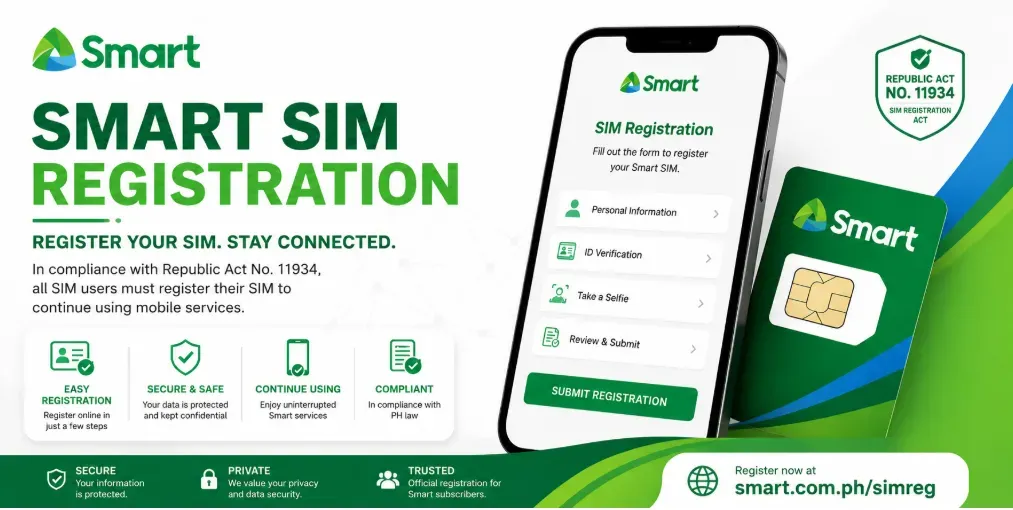
Whether you’ve purchased a new Smart Prepaid SIM, Smart Bro SIM, Smart Postpaid SIM, or Smart eSIM, you must complete the registration process through Smart’s official SIM registration portal.
This guide explains everything you need to know about Smart SIM registration, including requirements, accepted IDs, online registration steps, activation, verification, common issues, and frequently asked questions.
What Is Smart SIM Registration?
Smart SIM registration is the process of linking your Smart mobile number with your verified personal information. During registration, subscribers submit their personal details, upload a valid government-issued ID, and verify ownership through a One-Time Password (OTP).
After successful verification, the SIM remains active and can continue to access Smart’s mobile services.
Who Needs to Register a Smart SIM?
The following subscribers are required to register:
- Smart Prepaid SIM users
- Smart Bro Prepaid SIM users
- Smart Postpaid subscribers
- Smart eSIM users
- Smart Pocket WiFi SIM users
- LTE Home WiFi SIM users
- Replacement SIM users (when required under current Smart policies)
Foreign nationals purchasing a Smart SIM in the Philippines must also register and provide the required identification documents.
Benefits of Smart SIM Registration
Registering your Smart SIM offers several benefits:
- Protects against SIM-related fraud
- Reduces spam and scam messages
- Helps prevent identity theft
- Ensures uninterrupted Smart services
- Makes SIM replacement easier after verification
- Supports compliance with Philippine law
Smart SIM Registration Requirements
Before starting the registration process, prepare the following.
Personal Information
You will need to provide:
- Full name
- Date of birth
- Gender
- Nationality
- Residential address
- Mobile number
- Email address (if requested)
Ensure that all information matches your valid identification document.
Valid Government-Issued IDs
Smart generally accepts the following IDs for SIM registration:
- Philippine National ID (PhilSys ID)
- Passport
- Driver’s License
- UMID
- PRC ID
- Postal ID
- SSS ID
- GSIS ID
- Senior Citizen ID
- OWWA ID
- OFW ID
- Voter’s ID (if accepted)
- PWD ID
- NBI Clearance
- Police Clearance
- IBP ID
- Firearms License to Own and Possess ID
- School ID (for qualified students, if permitted under current guidelines)
Always check Smart’s official registration portal for the latest list of accepted IDs.
Requirements for Foreign Nationals
Foreign nationals may be asked to provide:
- Passport
- Visa information
- Proof of address in the Philippines
- Return or onward travel ticket (for temporary visitors, if applicable)
- Other documents required under current regulations
How to Register Your Smart SIM Online
Follow these steps to register your SIM successfully.
Step 1: Visit the Official Smart SIM Registration Portal
Open Smart’s official SIM registration website using your browser.
Always use the official Smart portal to protect your personal information.
Step 2: Enter Your Smart Mobile Number
Input your Smart mobile number.
Click the button to continue.
Step 3: Verify Using the OTP
Smart will send a One-Time Password (OTP) via SMS.
Enter the OTP within the required time.
Step 4: Complete the Registration Form
Provide your personal details, including:
- Full name
- Date of birth
- Gender
- Nationality
- Address
Review all information carefully before proceeding.
Step 5: Upload Your Valid ID
Take a clear photo or upload a scanned copy of your government-issued ID.
Ensure that:
- The image is clear.
- All text is readable.
- No part of the ID is cropped.
- The file meets Smart’s upload requirements.
Step 6: Upload a Selfie
Take a live selfie or upload one if requested.
The selfie should:
- Clearly show your face.
- Match the photo on your ID.
- Be taken in good lighting.
- Have no filters or obstructions.
Step 7: Review and Submit
Double-check all entered information.
Submit your registration.
Step 8: Wait for Confirmation
Once your application is successfully processed, Smart will send a confirmation message indicating that your SIM has been registered.
Keep the confirmation message for your records.
How to Check Smart SIM Registration Status
If you want to confirm whether your SIM has been registered:
- Review the SMS confirmation received after registration.
- Log in to the official Smart registration portal if status checking is available.
- Contact Smart Customer Service for assistance if necessary.
How Long Does Registration Take?
Most registrations are processed within a short period after submission.
However, verification times may vary depending on:
- System traffic
- Document verification
- Accuracy of submitted information
Common Smart SIM Registration Problems
OTP Not Received
If you do not receive the OTP:
- Check your mobile signal.
- Wait a few minutes.
- Request another OTP.
- Ensure your SIM is properly inserted.
Invalid ID Upload
If your ID upload fails:
- Use a clear image.
- Avoid blurry photos.
- Ensure the entire ID is visible.
- Try a different supported file format if necessary.
Selfie Verification Failed
If selfie verification fails:
- Retake the photo in good lighting.
- Remove sunglasses, hats, or masks.
- Face the camera directly.
Registration Pending
If your application remains pending:
- Allow additional processing time.
- Check for updates through Smart’s official channels.
- Contact Smart Customer Care if the delay is unusually long.
Tips for Successful Smart SIM Registration
To avoid delays:
- Use only the official Smart registration portal.
- Enter accurate personal information.
- Upload clear, high-quality images.
- Complete the process using a stable internet connection.
- Keep your confirmation message after successful registration.
What Happens If You Don’t Register Your Smart SIM?
Subscribers who fail to register their SIM within the deadlines established by applicable laws or regulations risk having their SIM deactivated. A deactivated SIM may no longer be able to make calls, send text messages, use mobile data, or access other Smart mobile services.
Always follow the latest guidance from Smart and the Philippine government regarding SIM registration requirements.
Frequently Asked Questions
Is Smart SIM registration free?
Yes. Registering your Smart SIM is completely free through Smart’s official SIM registration portal.
Can I register multiple Smart SIMs?
Yes. Individuals may register multiple Smart SIMs, provided each SIM is registered under the applicable legal requirements.
Can I update my registration details?
If you need to update your personal information, refer to Smart’s official support channels for the latest procedures.
Is SIM registration required for Smart Postpaid?
Yes. Smart Postpaid subscribers are also subject to SIM registration requirements, although some information may already be available as part of the postpaid account application process.
Can minors register a Smart SIM?
Yes. A minor may register a SIM in accordance with current regulations, typically under the supervision of a parent or legal guardian, who may also need to provide their information where required.
Can foreigners register a Smart SIM?
Yes. Foreign nationals can register a Smart SIM by submitting the required documents and complying with the applicable regulations.
How do I know if my Smart SIM is registered?
After successful registration, Smart typically sends a confirmation SMS. If you are unsure, you can also check through Smart’s official support channels.
Conclusion
Completing your Smart SIM registration is essential to keep your mobile services active and comply with the SIM Registration Act (Republic Act No. 11934). The online registration process is simple: verify your mobile number with an OTP, provide your personal information, upload a valid ID and selfie, and submit your application through Smart’s official portal.
To ensure a smooth experience, prepare your documents in advance, use accurate information, and register only through official Smart channels. Once your registration is approved, you can continue enjoying Smart’s voice, text, and data services without interruption.